> ## Documentation Index
> Fetch the complete documentation index at: https://docs.miona.bot/llms.txt
> Use this file to discover all available pages before exploring further.
# AutoMeme
> Automatically send fresh memes in a channel.
**AutoMeme** is a feature that engages your community by sending fresh, random memes to a channel. It's a great way to spark fun and keep your community entertained!
 ## ⚙️ How to set it up?
To set it up, just run the following command:
```sh theme={null}
/autopost automeme start [channel]
```
The `` argument specifies the delay between the memes and is required.
The minimum `` is `1 minute`. If you want to decrease the delay, please consider supporting us on our Patreon store [here](https://patreon.com/MionaBot).
Additionally, there is a limit of `1` AutoMeme channel per server. To increase this limit, consider supporting us on our Patreon store [here](https://patreon.com/MionaBot).
After setting up AutoMeme, you might be asked to vote for the bot if you haven't already.
The bot will ask you to vote every **48 hours**.
Servers with active `Premium` and `Platinum` subscriptions are not required to vote.\
Check out our [Patreon Store](https://patreon.com/MionaBot) to learn more.
## ⚙️ How to set it up?
To set it up, just run the following command:
```sh theme={null}
/autopost automeme start [channel]
```
The `` argument specifies the delay between the memes and is required.
The minimum `` is `1 minute`. If you want to decrease the delay, please consider supporting us on our Patreon store [here](https://patreon.com/MionaBot).
Additionally, there is a limit of `1` AutoMeme channel per server. To increase this limit, consider supporting us on our Patreon store [here](https://patreon.com/MionaBot).
After setting up AutoMeme, you might be asked to vote for the bot if you haven't already.
The bot will ask you to vote every **48 hours**.
Servers with active `Premium` and `Platinum` subscriptions are not required to vote.\
Check out our [Patreon Store](https://patreon.com/MionaBot) to learn more.
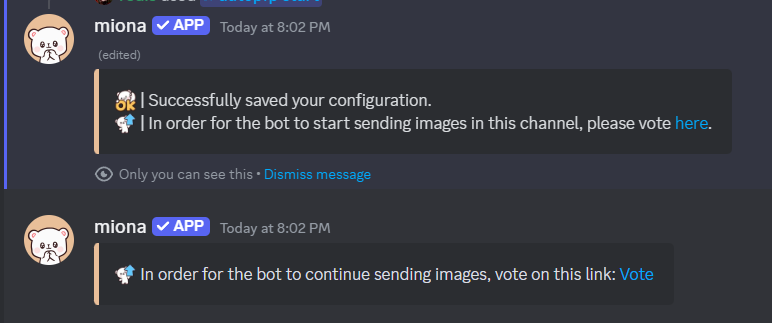 When you are voting, please use the link provided by the bot or by running `/vote` in your server. The link provided by the bot is unique and identifies your server. This is the only way for us to confirm your vote.
After you've voted, the bot will start sending fresh memes in your selected channel.
## ❌ How to disable?
You can disable AutoMeme by running the following command:
```sh theme={null}
/autopost automeme stop [channel]
```
If you don't specify a channel, the channel where you run the command will be used.
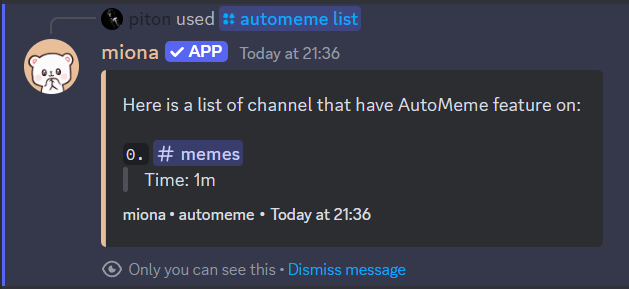
## 📋 How to see your AutoMeme channels?
You can see your AutoMeme channels by running the following command:
```sh theme={null}
/autopost automeme list
```
When you are voting, please use the link provided by the bot or by running `/vote` in your server. The link provided by the bot is unique and identifies your server. This is the only way for us to confirm your vote.
After you've voted, the bot will start sending fresh memes in your selected channel.
## ❌ How to disable?
You can disable AutoMeme by running the following command:
```sh theme={null}
/autopost automeme stop [channel]
```
If you don't specify a channel, the channel where you run the command will be used.
## 📋 How to see your AutoMeme channels?
You can see your AutoMeme channels by running the following command:
```sh theme={null}
/autopost automeme list
```