> ## Documentation Index
> Fetch the complete documentation index at: https://docs.miona.bot/llms.txt
> Use this file to discover all available pages before exploring further.
# Auto Responders
> Automatically respond to messages using triggers and actions
🤖 **Auto Responders**
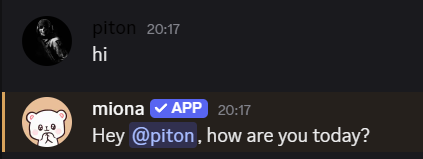
Auto Responders allow you to set up automatic replies or reactions based on specific triggers. This feature is useful for answering common questions, acknowledging certain phrases, or enhancing interactivity in your server.
 ## 🔥 Features
✅ Trigger-based responses – Supports plain text and regex patterns\
✅ Two response types – Send a message or react with an emoji\
✅ Easy management – Edit, import, and delete with simple commands
## 🛠️ Commands
### 🔹 Create an Auto Responder
```sh theme={null}
/autoresponders create [channel]
```
* **Name**: (Optional) Used to organize your responders
* **Trigger**: A text string or regular expression
* **Response Type**: `message`, `reaction` or `role`
* **Channel**: (Optional) Restrict the responder to a specific channel
### 🔹 Edit the Response
```sh theme={null}
/autoresponders edit-response
```
Modify the message that will be sent when the responder is triggered.
### 🔹 Import a Saved Embed
```sh theme={null}
/autoresponders import-embed
## 🔥 Features
✅ Trigger-based responses – Supports plain text and regex patterns\
✅ Two response types – Send a message or react with an emoji\
✅ Easy management – Edit, import, and delete with simple commands
## 🛠️ Commands
### 🔹 Create an Auto Responder
```sh theme={null}
/autoresponders create [channel]
```
* **Name**: (Optional) Used to organize your responders
* **Trigger**: A text string or regular expression
* **Response Type**: `message`, `reaction` or `role`
* **Channel**: (Optional) Restrict the responder to a specific channel
### 🔹 Edit the Response
```sh theme={null}
/autoresponders edit-response
```
Modify the message that will be sent when the responder is triggered.
### 🔹 Import a Saved Embed
```sh theme={null}
/autoresponders import-embed