> ## Documentation Index
> Fetch the complete documentation index at: https://docs.miona.bot/llms.txt
> Use this file to discover all available pages before exploring further.
# Giveaways
> Host interactive giveaways in any channel you choose.
Giveaways are a fun and effective way to engage your community and distribute rewards. You can set up fully customizable giveaways in any channel, choose how long they last, and let members join or leave with ease.
 ## 🎉 How to Start a Giveaway
To begin a giveaway, simply run:
```sh theme={null}
/giveaway start
```
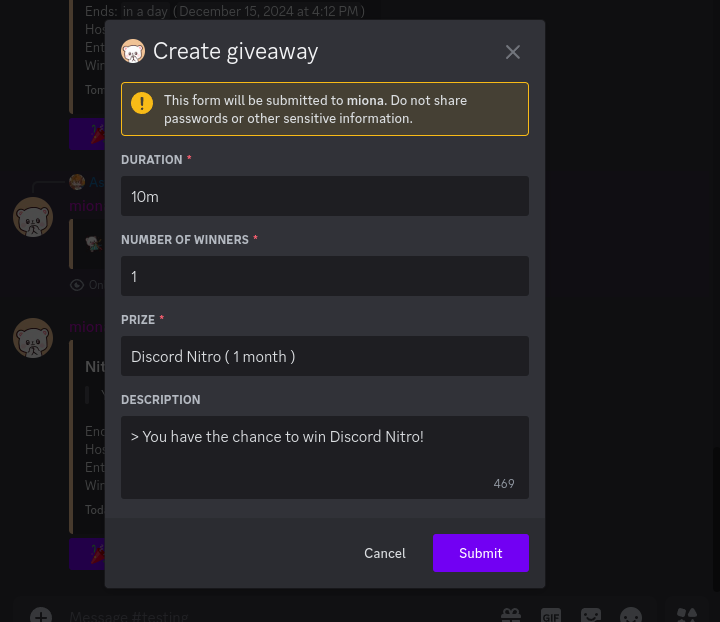
After running the command, a form will appear where you can fill in the giveaway details such as:
* Prize
* Duration
* Number of winners
* Description
Click **Submit** to launch the giveaway!
## 🎉 How to Start a Giveaway
To begin a giveaway, simply run:
```sh theme={null}
/giveaway start
```
After running the command, a form will appear where you can fill in the giveaway details such as:
* Prize
* Duration
* Number of winners
* Description
Click **Submit** to launch the giveaway!
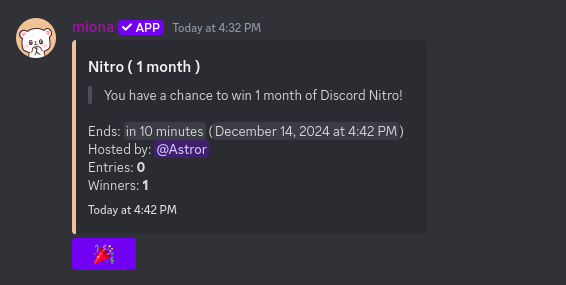
 A giveaway embed will be posted in the current channel, along with a join button for members.
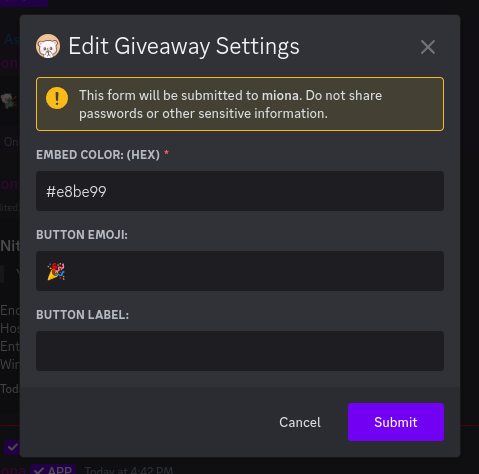
## ⚙️ Editing Giveaway Settings
To customize the appearance and behavior of giveaways, use:
```sh theme={null}
/giveaway settings
```
You’ll be able to modify:
* Embed color
* Join button emoji
* Button label
A giveaway embed will be posted in the current channel, along with a join button for members.
## ⚙️ Editing Giveaway Settings
To customize the appearance and behavior of giveaways, use:
```sh theme={null}
/giveaway settings
```
You’ll be able to modify:
* Embed color
* Join button emoji
* Button label
 ## 🔁 Rerolling a Winner
Need to pick a new winner? After a giveaway ends, run:
```sh theme={null}
/giveaway reroll [winners_count]
```
## ⏹️ Ending a Giveaway Early
To forcibly end an ongoing giveaway and pick a winner immediately, use:
```sh theme={null}
/giveaway end
```
## 👥 Viewing Giveaway Participants
To view all participants (entries) in a giveaway, use:
```sh theme={null}
/giveaway entries
```
## 🗑️ Deleting a Giveaway
If you want to cancel a giveaway without drawing a winner, use:
```sh theme={null}
/giveaway delete
```
The giveaway will be removed immediately.
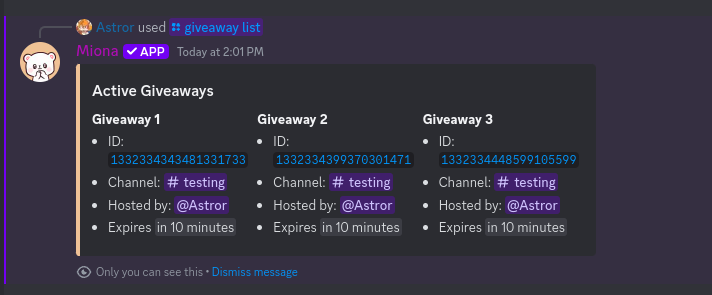
## 📋 Viewing Active Giveaways
To see a list of all currently active giveaways, run:
```sh theme={null}
/giveaway list
```
## 🔁 Rerolling a Winner
Need to pick a new winner? After a giveaway ends, run:
```sh theme={null}
/giveaway reroll [winners_count]
```
## ⏹️ Ending a Giveaway Early
To forcibly end an ongoing giveaway and pick a winner immediately, use:
```sh theme={null}
/giveaway end
```
## 👥 Viewing Giveaway Participants
To view all participants (entries) in a giveaway, use:
```sh theme={null}
/giveaway entries
```
## 🗑️ Deleting a Giveaway
If you want to cancel a giveaway without drawing a winner, use:
```sh theme={null}
/giveaway delete
```
The giveaway will be removed immediately.
## 📋 Viewing Active Giveaways
To see a list of all currently active giveaways, run:
```sh theme={null}
/giveaway list
```