> ## Documentation Index
> Fetch the complete documentation index at: https://docs.miona.bot/llms.txt
> Use this file to discover all available pages before exploring further.
# Mass Role
> Add or remove a role from a member or a group of members at once.
The **Mass Role** command allows server administrators to quickly assign or remove a specific role from one member or multiple members at once. It's especially useful for managing large servers where manual role updates would be inefficient.
Whether you want to grant a role to everyone in a particular role or remove access from many users at once, this command simplifies the task.
## ⚙️ Permissions Required
You must have the `Administrator` permission to use this command.
## ℹ️ How to Use
To use the Mass Role command, simply type `/massrole` followed by the action you want to perform (add or remove), the target (user or role), and the role you want to assign or remove.
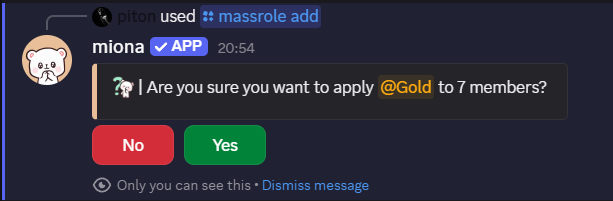
When you run the command for the first time you will be prompted to confirm your action.
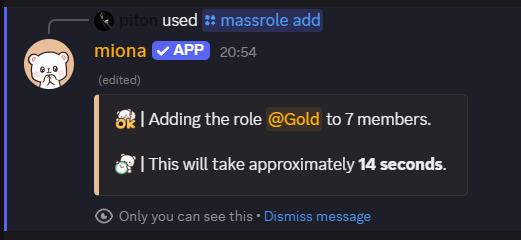
 After that the bot will start the action.
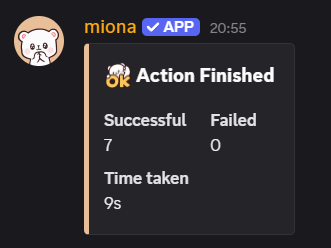
 When the action is finished, the bot will send a message in the channel where you ran the command.
 ## ✨ Subcommands
### ➕ `/massrole add `
Assigns the specified role to a single user or to all members who currently have a specific role.
* `mention`: A user or role mention.
* `role`: The role you want to assign.
**Examples:**
```sh theme={null}
/massrole add @User @Verified
/massrole add @Members @Event
```
### ➖ `/massrole remove `
Removes the specified role from a single user or from all members of a specified role.
**Examples:**
```sh theme={null}
/massrole remove @User @Beta
/massrole remove @OldMembers @Tester
```
### ⏹️ `/massrole stop`
Stops a running mass-role action if one is in progress.
### 🔎 `/massrole status`
Displays the current status of any ongoing mass-role process.
## 🔔 Notes
* The command is powerful—use it carefully, especially when targeting large roles.
* Only one mass-role operation can run at a time.
* Mass-role actions may take some time to complete depending on server size.
## ✨ Subcommands
### ➕ `/massrole add `
Assigns the specified role to a single user or to all members who currently have a specific role.
* `mention`: A user or role mention.
* `role`: The role you want to assign.
**Examples:**
```sh theme={null}
/massrole add @User @Verified
/massrole add @Members @Event
```
### ➖ `/massrole remove `
Removes the specified role from a single user or from all members of a specified role.
**Examples:**
```sh theme={null}
/massrole remove @User @Beta
/massrole remove @OldMembers @Tester
```
### ⏹️ `/massrole stop`
Stops a running mass-role action if one is in progress.
### 🔎 `/massrole status`
Displays the current status of any ongoing mass-role process.
## 🔔 Notes
* The command is powerful—use it carefully, especially when targeting large roles.
* Only one mass-role operation can run at a time.
* Mass-role actions may take some time to complete depending on server size.